GDS II (Calma GDS II)
GDS II is a database file format which is the de facto industry standard for data exchange of integrated circuit or IC layout artwork. It is a binary file format representing planar geometric shapes, text labels, and other information about the layout in hierarchical form. The data can be used to reconstruct all or part of the artwork to be used in sharing layouts, transferring artwork between different tools, or creating photo masks. Initially, GDS II was designed as a format used to control integrated circuit photo mask plotting. Despite its limited set of features and low data density, it became the industry's default format for transfer of IC layout data between design tools of different vendors, all of which (at that time) operated with often incompatible and proprietary data formats. The file format was originally developed by Calma for its layout design software, "Graphic Data System" ("GDS") and "GDS II". Currently, the format is owned by Cadence Design Systems. GDS II files are usually the final output product of the IC design cycle and are given to silicon foundries for IC fabrication. GDS II files were originally placed on magnetic tapes. This moment was fittingly called "tape out" though it is not the original root of the term. Objects contained in a GDS II file are grouped by assigning numerical attributes to them including "layer number", "datatype" or "texttype". While these attributes were designed to correspond to the "layers of material" used in manufacturing an integrated circuit, their meaning rapidly became more abstract to reflect the way that the physical layout is designed. As of October 2004, many EDA software vendors have begun to support a new format, OASIS, which may replace GDS II.
GDS II in the LayoutEditor
GDS II is the default file format for the LayoutEditor and fully supported in its all existing versions (version 3 to version 7). Also the GDS II structure is used for internal data representation in the LayoutEditor. This enables fast performance and avoids any unecessary conversion. GDS II files can be read as normal files or gzip compressed files without an external decompresser. Some GDS II options can be set up via the setup dialog:
Handling of Layers in GDS II
The GDS II saves a layer number for each shape, such as a polygon, path, etc. By default the LayoutEditor keeps this number untouched. As an option, it is possible to set up layer mapping during load/save. With this mapping, a combination of layer/datatype in the GDS II file can be mapped to a layernumber in the LayoutEditor. This can be done via the SetupDialog or via a macro. The GDS II specification is not designed to store layer names. The LayoutEditor can store layer names by a non-standard extension (see below).
Set Maximal Number of Points in Polygons
Version 3 of the GDS II file format limits the maximum size of polygons/path elements to 200 vertices. The technical limit of the file format structure is 8191 points, which is allowed in version 7. This limit can be set via the setup dialog or via a macro. If a polygon exceeds this limit, it will be split into two or more polygons when saving the file. The default setting is 8191. As a workaround it is possible to save polygons in multi-records and avoid that limit. This is not part of the GDS standard, but supported by some viewers. Activate 'gdsMultiXYRecord' to use it and avoid splitting any polygons.
Option: Padding the Filesize to N*2048
Some older software or tape devices can only handle GDS II files, if the file size is a multiple of 2048 bytes. By activating this option via the setup dialog or via a macro, all saved GDS II files will be padded to this length by adding a 0 at the end of the file. This option is rarely needed and the default for this function is off.
Option: Save Box as Polygon
Box elements were introduced with version 4 of the GDS II file format. After activating this option with the SetupDialog or via a macro, all box elements will be saved as a polygon. By default this option is turned off.
Option: Save Path as Polygon
Path elements with a width greater than 0 will be saved as a polygon. By default this option is turned off. This option is useful, if the mask vendor does not accept shapes other than polygons. (introduced with version 20120824)
Option: Save Text as Polygon
GDS II does not specify fonts. Therefore, text elements may look different with other viewers and are often ignored in mask production. By activating this option via the SetupDialog or via a macro, all text elements will be saved as polygons. The current design in memory is modified as well with any save operation. To convert scale-independent text elements as well, select a non-zero default text size value for this option in the setup. By default the Save Text as Polygon option is turned off.
Option: Multi XY Records
Due to the GDSII file format's block structure, the maximum size of polygons is limited to 8192. Larger polygons that conform to the GDSII standard cannot be saved. A polygon exceeding this limit will be split by default. However it is possible to save such large polygon in multiple blocks. This method will allow an unlimited number of polygon points. The extension is not part of the GDSII standard, but supported by some other GDSII software tools.
Option: Only Save Enabled Layers
If enabled, shapes on disabled layers are ignored and not stored during a GDSII save. (introduced with version 20120824)
Option: Store Layer Names
By default GDSII only stores layer numbers. The names of the layers and its appearance in the design is not stored. By activation this option the layer names will be store in the GDSII file. This is done by adding an additional cell to the design with the name LayerNames that contains a text elements on each layer with the layer names. Colors, and style of the layer are stored as attributes of the text element. If this option is activated, that additional cell will not be visible in the LayoutEditor. This option is not a part of the GDSII standard. However, it will not interference with any other GDSII tool as long as no cell with the mentioned named is used in the design.
Option: Validate File
A file validation is performed after any save operation. This is done by calculation a SHA1 checksum during the save process. This checksum is validated for the stored file in a second step to ensure that the GDSII file is correctly stored. The SHA1 checksum is stored as well in a file with the extension sha1 next to the GDSII file. It can be used to validate the file with common checksum checkers like sha1sum. (introduced with version 20130101)
Description of the GDSII File Format
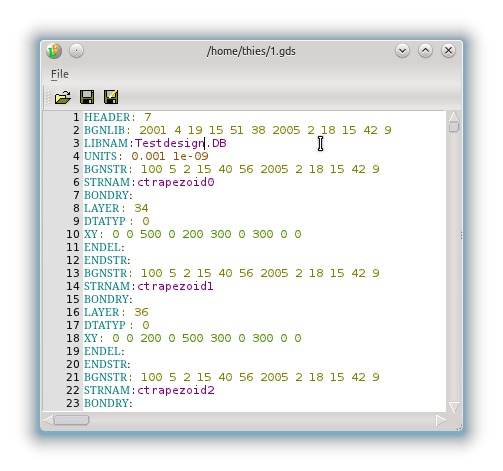
The GDSII or Stream file format stores its information in records. Each record starts with two bytes containing the length of the record. So, the maximum size of a record is limited to 2^16 bytes. After the length record follows a record type and a data type byte. The GDSII specification includes the description of 69 different record types, but less than the half are normally used. Coimmonly used types are LAYER, BOUNDARY (=Polygon), PATH, SREF (=cell reference) or XY (to store coorinates). Seven stream data types are defined. Each record type must have the specified data type. The following data types are supported: no data, bit array, two byte signed integer, four byte singed integer, four byte real, eight byte real and ASCII string. The raw data of a GDSII is in binary, however the integrated TextEditor of the LayoutEditor can convert it from/to readable text. So, the integrated TextEditor can be used for low-level manipulation of GDSII files.